
Ranges and Strategies
How the Ranges page in BluffLog works: table sizes, the tree of spots, separate PKO charts, choosing your own strategy and the opponent's, cloning, editing frequencies, import and export, and copying a chart as text.
The Ranges page keeps strategies: sets of preflop charts the app checks your decisions against and builds the opponent’s range from in the hand review. The bundled “Base strategy” is an approximate model, not a recommendation on how to play.
Table sizes and the tree of spots
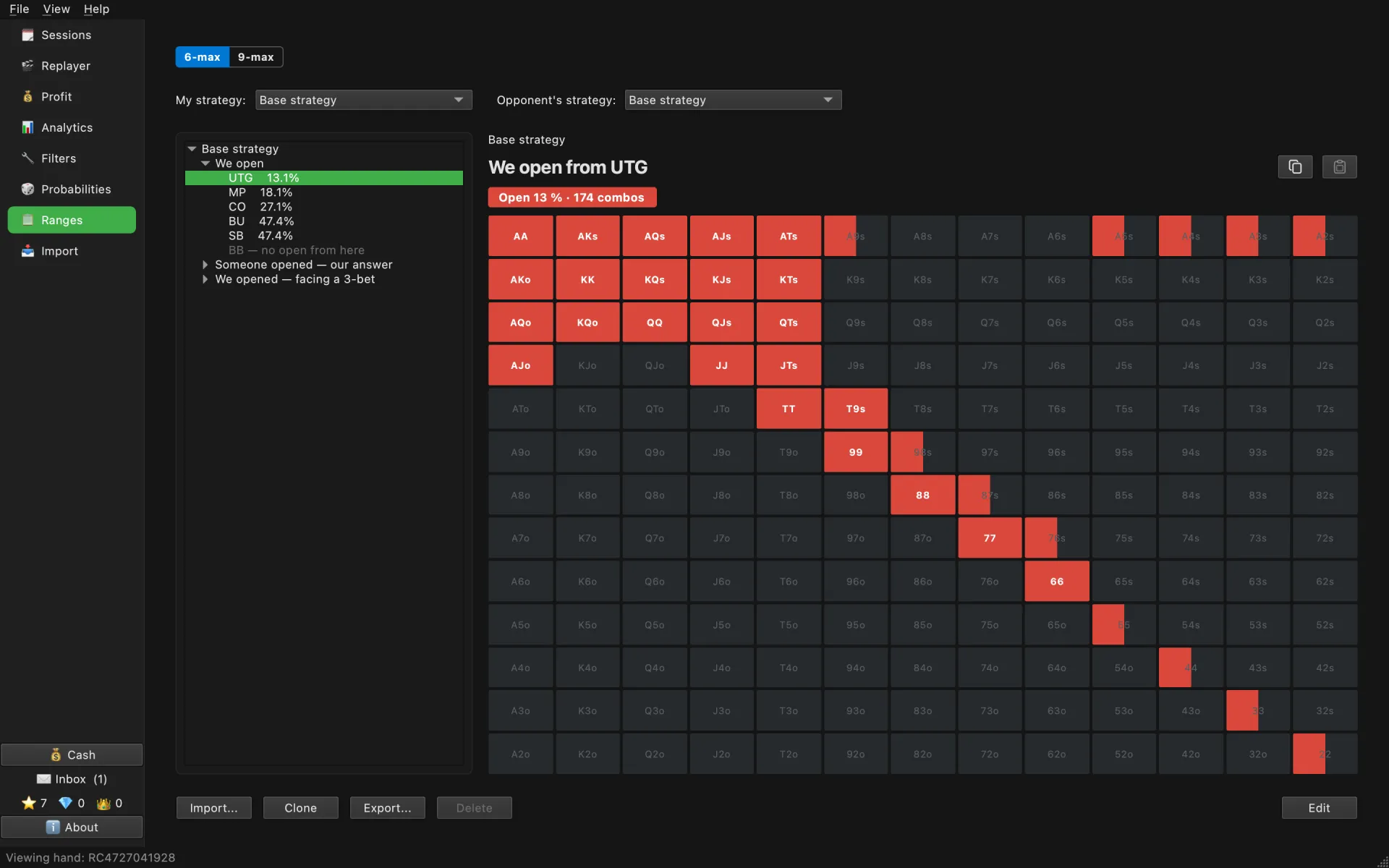
The table size is picked at the top: 6-max and 9-max in cash, 6-max, 8-max and 9-max in tournaments. On the left is the tree of spots, “We open”, “Someone opened — our answer”, “We opened — facing a 3-bet”, with each position’s share of hands in the chart. Click a node to see its chart. Above the grid is the spot’s name and a chip for each action: “Open 13 % · 174 combos”. A partly filled cell is a mixed frequency: the chart plays the hand that way only part of the time.
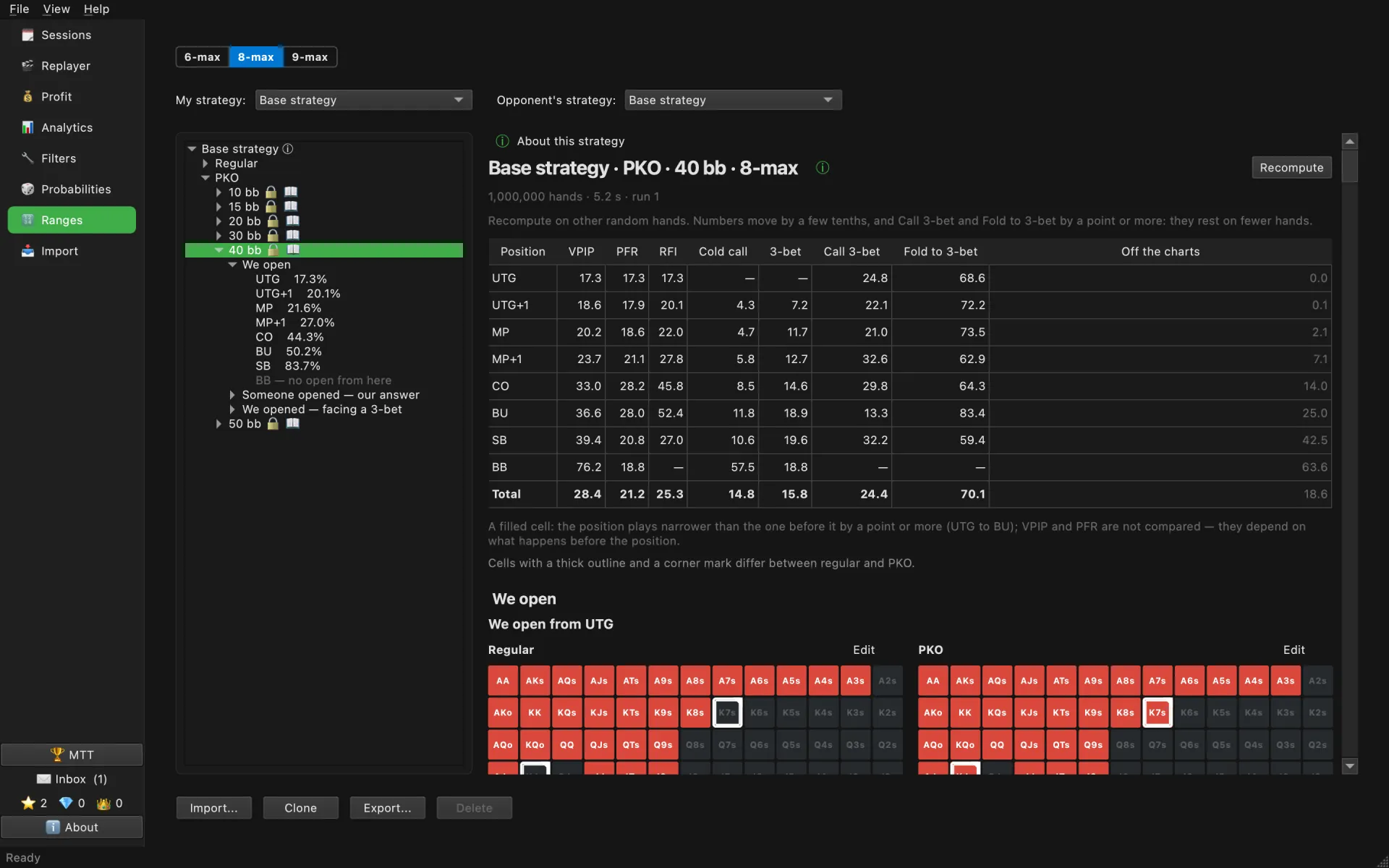
In tournaments the tree also splits by stack depth in bb, and PKO is a node of its own next to Regular, with its own charts. A click on a depth opens the whole branch: every spot is a “Regular | PKO” pair of charts, with the cells where they differ outlined. “Compute” above the pairs plays a million hands with the whole table following the branch and shows VPIP, PFR, RFI, cold call, 3-bet, call and fold to 3-bet, and the share of decisions off the charts, by position. A filled cell is a position that plays narrower than the one before it by a point or more. “Recompute” counts again on other random hands, which shows how far the numbers can be trusted. The table, the legend and the pairs scroll together. A click on a spot in the tree opens a single chart. The ⓘ next to the strategy’s name and “About this strategy” above the charts tell you what the strategy is; for your own strategy you can write the description yourself.
My strategy and the opponent’s
The two drop-downs above the tree are set separately for cash and for tournaments:
- “My strategy:” is what the line about your own hand in the review, and the strategy fit strips, are read from. If it has no chart for a spot, there is no line: putting someone else’s strategy here would describe a different player.
- “Opponent’s strategy:” is what the opponent’s range is calculated from. If it has no chart for the spot, the nearest strategy with charts is used, and the review says so.
Your own copy
A bundled strategy cannot be changed. “Clone” makes a copy under your own name, and that copy can be picked in either drop-down.
- “Edit” on a chart or on a square of a pair opens an edit window for that chart: pick an action and drag across the cells. A slider sets a cell’s frequency in steps of 5 %, or 1 % with Shift, and the number can be typed beside it. “Save” keeps the edit, “Cancel” closes the window without it; the page under the window shows the edit at once.
- “Export…” writes the strategy with all its depths to a file; “Import…” adds a strategy from such a file.
- The two icons above the chart, on the right, copy the chart to the clipboard as text and paste it back. Pasting works in the edit window and expects lines like “raise: AA:1, KK:1, AQs:0.5”, or just a list of hands, which goes into the selected action.
→ See also: Strategy Fit, Hand Review.