
Installing BluffLog on macOS
BluffLog isn't signed with an Apple Developer certificate yet, so macOS blocks the first launch. Signing is planned. Until then the first start costs three extra clicks — all of them below.
- Download the DMG
Download BluffLog-vX.X.X.dmg from the main page.
- Open the DMG
Double-click the downloaded .dmg file. A window will open with the BluffLog app.
- Install the app
Drag BluffLog to the Applications folder (or any folder you prefer).
- Try to launch it — macOS will refuse
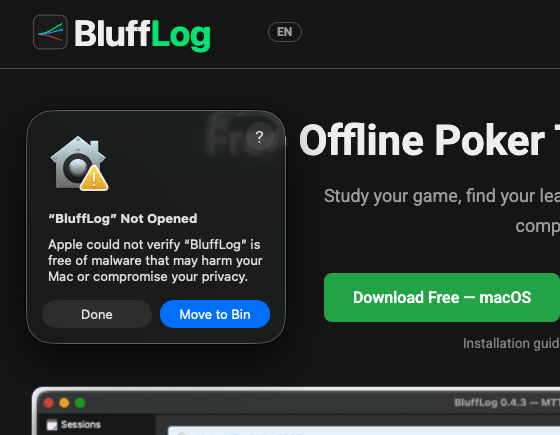
Open BluffLog as usual, by double-clicking it. macOS shows “BluffLog Not Opened” and says Apple could not verify the app. Click Done.
- Allow it in System Settings
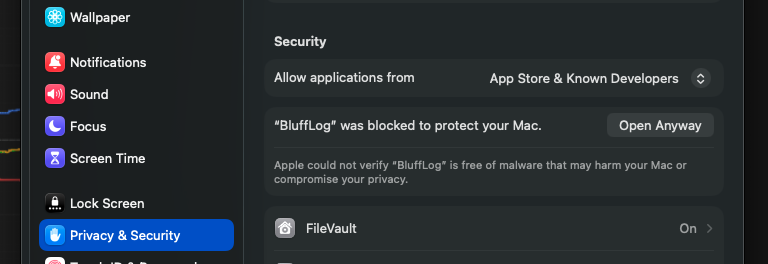
Open System Settings → Privacy & Security and scroll down to the Security section. It now reads “BluffLog was blocked to protect your Mac”. Click Open Anyway, and confirm with Touch ID or your password if asked.
- Confirm once more
A second dialog asks “Open BluffLog?”. Click Open Anyway. The app starts and macOS remembers the choice.
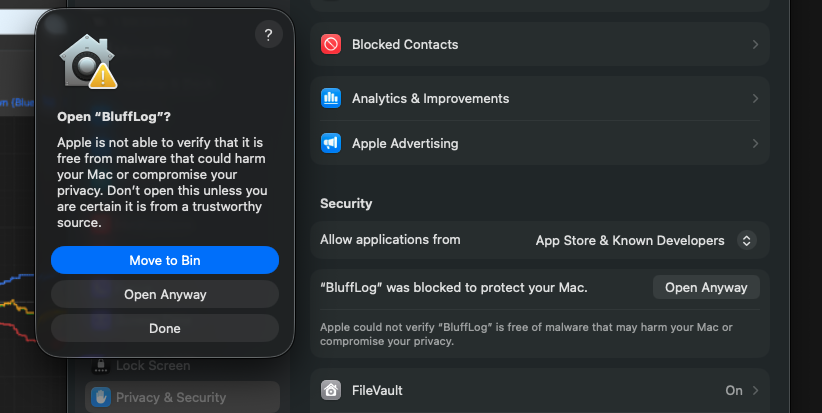
⚠️ In both dialogs the highlighted button is “Move to Bin” (“Move to Trash”) — it deletes BluffLog. The button you need is “Done” in the first dialog and “Open Anyway” in the second.
💡 This is a one-time procedure. After the first launch BluffLog opens normally — by double-click or from the Dock.
On macOS 14 and earlier there is no Settings step: right-click the app, choose Open, then click Open in the dialog.
🎉 Done!
BluffLog is now installed. Import your hand histories and start analyzing your game.
← Back to main page